
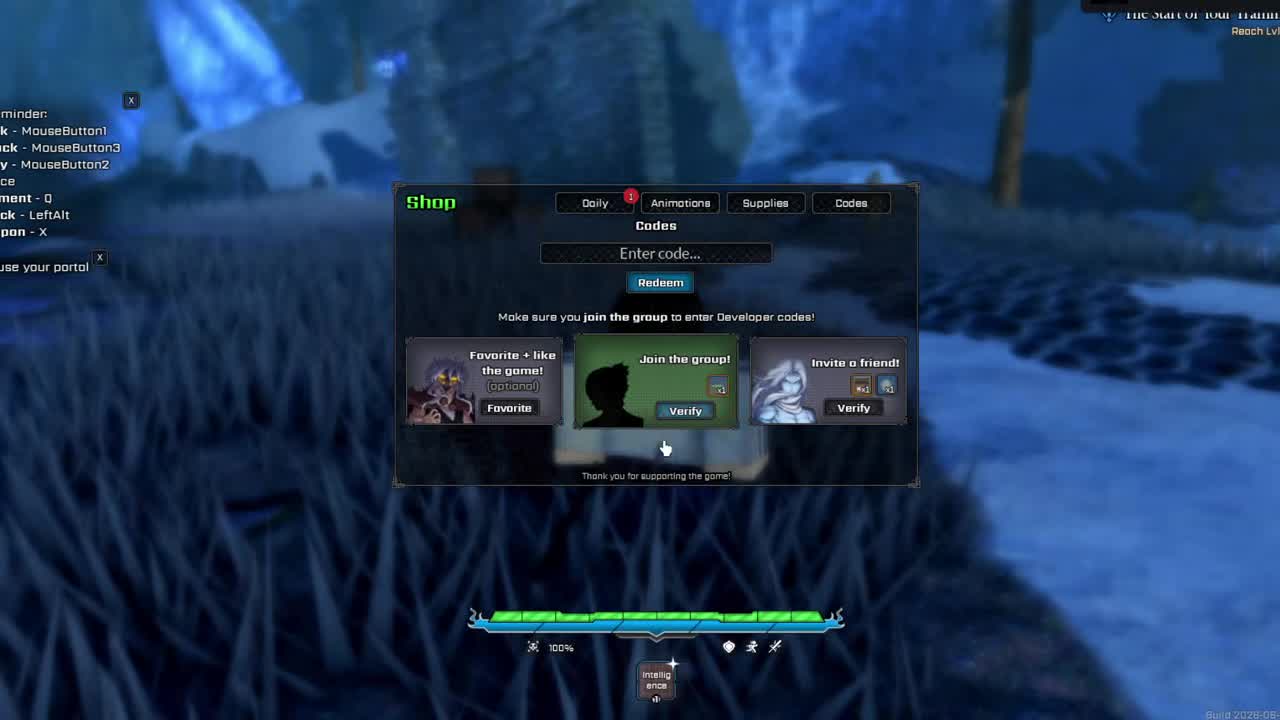
Codes tab and redeem UI
Watch where the Shop icon, Codes tab, text box and Redeem button appear, then come back here to copy exact code text.
Copy the current working code, see the reward, follow the in-game redeem path, and use the troubleshooting table if the Codes menu, group verification or Redeem button blocks you.
UPD2
20 Ability Rerolls + 1 Build Reset Token
UPD2 is the working code in this July 10 snapshot. Join the Midnight Continent Roblox group or community and use Verify in the Codes menu when prompted. Codes can expire without warning.
These codes are listed as expired in the current July snapshot, so do not keep retrying them.
| Expired code | Expired code |
|---|---|
MINIUPDATE | UPDATE1 |
160KLIKES | 35ROLLS |
140KLIKES | SHUTDOWNFIX |
MIDVVEEK | FEWREROLLS |
100KLIKES | FULLRELEASE |
75KLIKES | SDFIX |
30KLIKES | day1 |
If the Codes menu or Verify step is missing, check these prerequisites first.
Finish the opening tutorial and faction setup far enough for the Shop and Codes menu to appear.
Next: Beginner guideJoin the Midnight Continent Roblox group or community, return to the same Roblox account, then use Verify in the Codes menu when prompted.
Next: Roblox linksPC and mobile use the same in-game Shop flow.
Open VV ULTIMATUM on Roblox, press Play, finish tutorial and faction selection if needed.
Click or tap the shopping cart icon in the top-left of the screen.
Select Codes at the top of the Shop window, then press Verify if the group prompt appears.
Paste UPD2, press Redeem, then check your Ability Rerolls and Build Reset Token.
Use videos for the exact Shop, Codes tab, Verify prompt and success message. Use this page for copyable code text and current status.
Watch where the Shop icon, Codes tab, text box and Redeem button appear, then come back here to copy exact code text.
Match the symptom first, then fix the likely cause.
| Symptom | Likely cause | Fix |
|---|---|---|
| Invalid code | Typo, extra space, expired code or a server that has not refreshed | Copy UPD2 exactly. If a newly released code is not recognized, rejoin a refreshed server before retrying. |
| Already redeemed | The account has already claimed the code | Do not keep retrying the same account; check your reward counters first. |
| Shop or Codes menu missing | Opening flow is incomplete | Finish the tutorial and faction setup far enough for the Shop flow to appear. |
| Verify prompt stuck | Wrong Roblox account or group membership not recognized | Join Midnight Continent on the same account, return to the game, then press Verify again. |
| Reward not visible | UI delay or reward counters have not refreshed | Reopen the relevant menu and rejoin once before assuming the code failed. |
Checked July 10, 2026: UPD2 is the working code listed on this page. It rewards 20 Ability Rerolls and 1 Build Reset Token.
UPD2 gives 20 Ability Rerolls and 1 Build Reset Token.
Join the Midnight Continent Roblox group or community and use Verify in the Codes menu when prompted before redeeming.
MINIUPDATE, UPDATE1, 160KLIKES, 35ROLLS, 140KLIKES, SHUTDOWNFIX, MIDVVEEK, FEWREROLLS, 100KLIKES, FULLRELEASE, 75KLIKES, SDFIX, 30KLIKES and day1 are listed as expired.
Check the code spelling and casing, make sure the code has not expired, complete enough of the opening flow to access the Codes menu, verify the Midnight Continent group when prompted, and try a refreshed server if a new code is not recognized.
New codes are commonly announced through the game's official Discord and Roblox community channels around updates or milestones.
Codes are the start of the route. Spend rewards with a plan.
This guide is written and maintained by Gaven for the VV ULTIMATUM Wiki, an independent, community-run project documenting VV ULTIMATUM on Roblox. We are not affiliated with VV Team or Roblox Corporation.